
How Much AI Should I Use on My Social Media?
Quick Summary
AI is more accessible than ever, and it’s here to stay. From flyers to UGC videos, AI-generated content is everywhere on social media. With the floodgates open and endless possibilities within reach, you may be wondering: how much AI is too much? We believe AI is best used as a tool, not a replacement for human creativity and presence. Some effective ways to use AI for your social media include:
- Brainstorming content ideas
- Creative editing tools
- Proofreading/editing your captions
People use social media to connect with real people, not AI. Even when using AI as a tool, we recommend using it to perfect what you have, not replace it.

How to Use AI to Brainstorm Effectively
Your favorite LLMs (large language models like Claude, Gemini, and ChatGPT) perform best when you take the time to shape them. One of the most common mistakes we see is an LLM used only at the surface level. For example, if you own a roofing company, don’t simply give the prompt: “I own a roofing company, give me 5 ideas for a social media post.”
This approach will give you ideas, but they will likely be generic ones that hundreds of other roofing companies are already using.
Provide Context
Instead, take the time to tell it about your business. Consider these questions:
- What makes you different from other roofing companies?
- Who is your ideal customer?
- What do your customers care most about when they pick a roofing company?
- What is your brand voice? (Professional, friendly, funny, etc.)
- What are your goals?
Once you answer these questions and share them with your favorite LLM, you will get more personalized suggestions that will likely resonate with your audience more effectively.
Be Critical and Give Feedback
Don’t just accept whatever AI generates without reading through it and giving feedback. It can often take your critiques and effectively adjust to your suggestions. The more you critique it, the more it learns your preferences and style. Without feedback, it falls back on its default settings.
For example, ChatGPT is known for using dashes (--) in its writing. I used to use dashes frequently before the days of ChatGPT, but now I hesitate because I don’t want my human writing to be mistaken for AI. If you aren’t critical of the content, it will likely have that recognizable AI flavor instead of the authentic human voice social media users are craving.
Our Favorite Tools That Use AI for Creatives
You may have noticed that Meta now labels “AI Content.” This label doesn’t just apply to written content and images fully generated by AI. It also extends to editing tools that use AI. For example, if you use Canva’s Magic Eraser tool to remove an unwanted element in a picture you took, Meta may flag it as AI content.
At
Hummingbird Media, we like to use tools like Canva and CapCut to create reels, graphics, and more. We always start with our own concepts and media, then use AI tools when needed to polish the work. Some of these AI tools require premium subscriptions.
As a general rule of thumb, we recommend using AI only when it can elevate what you already have without feeling artificial. Once it no longer feels like you or your brand, you’re better off with your own work.
Helpful Canva Features That Use AI
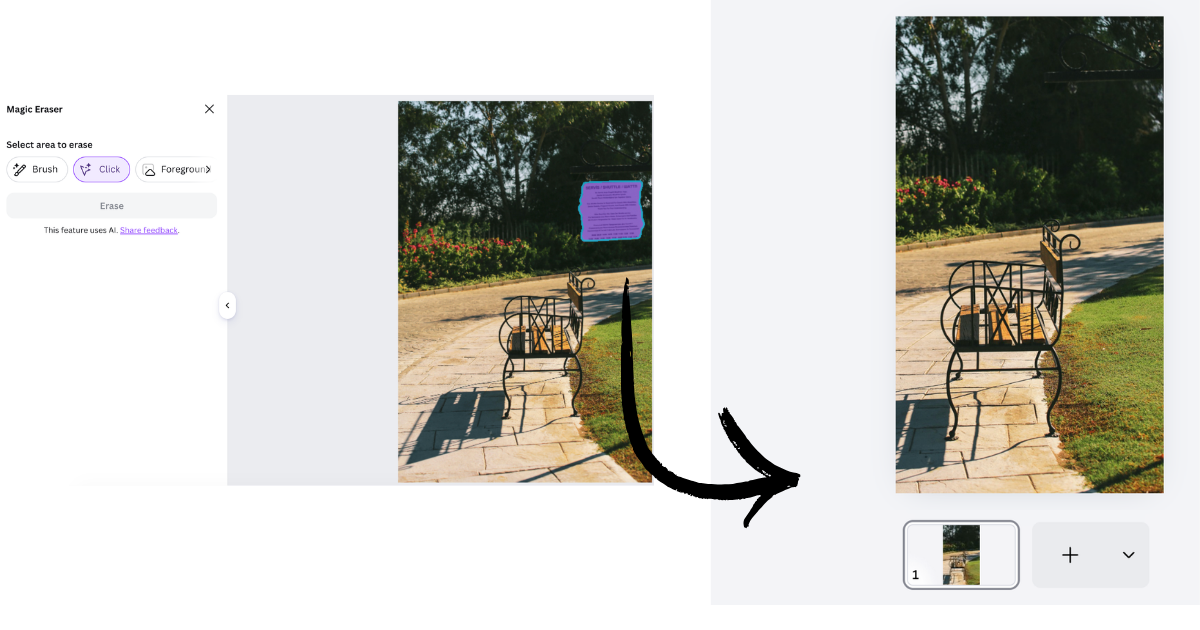
Magic Eraser
The Magic Eraser helps remove unwanted objects from a background. As with all AI tools, it’s not perfect. If the photo looks unnatural after automatic removal, it's better to remove it manually with a photo editor.
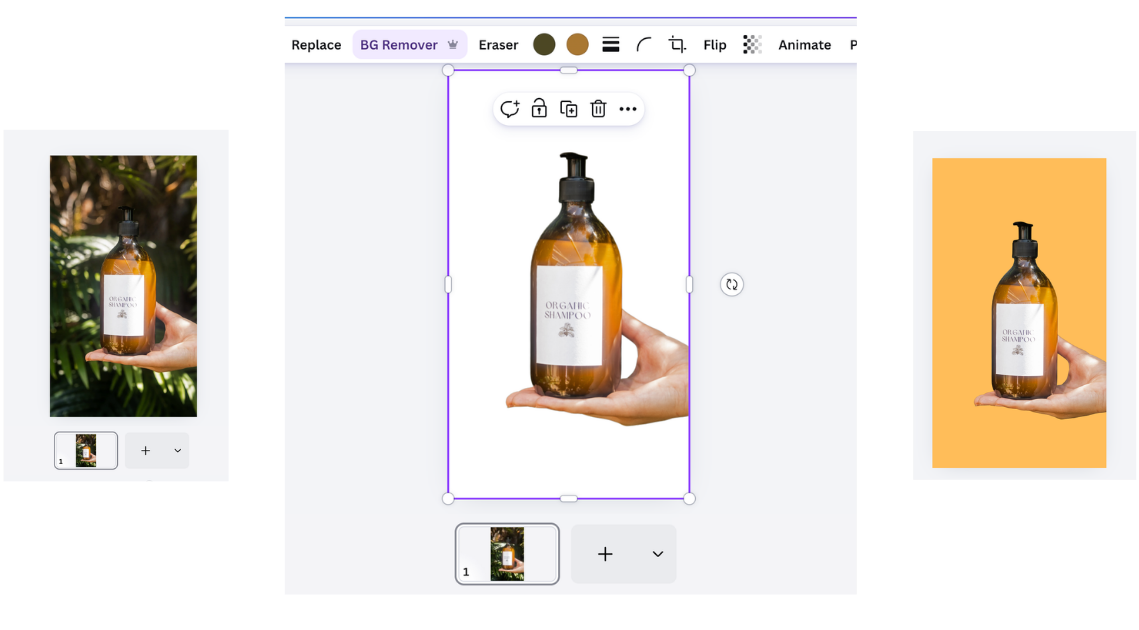
Background Remover
The Background Remover tool can be effective when making graphics, especially when highlighting a product. Like the Magic Eraser, it doesn't always remove backgrounds cleanly, so use your best judgment. Generally, the more prominent your focus subject is, the easier it will be to remove the background.
Magic Expand
The Magic Expand tool can be useful when you have a photo with a plain background that isn’t quite the ratio you need. Instead of zooming in, you can use Magic Expand to extend the background and make it look natural. This works best with plain backgrounds.
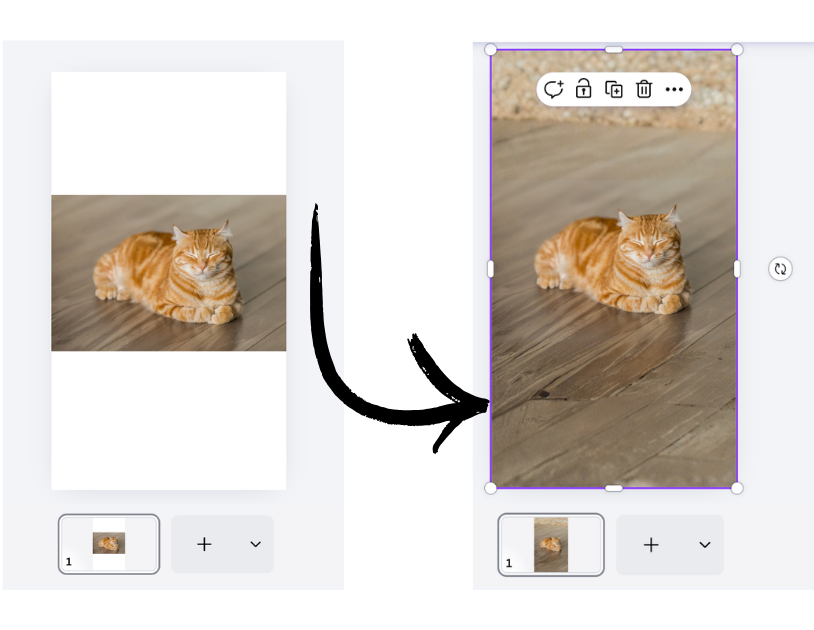
If the background has a lot of imagery, complex lighting, or patterns, the effect may look fake. In the example above, you can see that the wood flooring looks unnatural when using this tool. In this case, it's better to use a different image or add a neutral background that blends with the image.
Effective CapCut Tools that Use AI
CapCut has several AI tools; while we don’t recommend using all of them, a few are helpful.
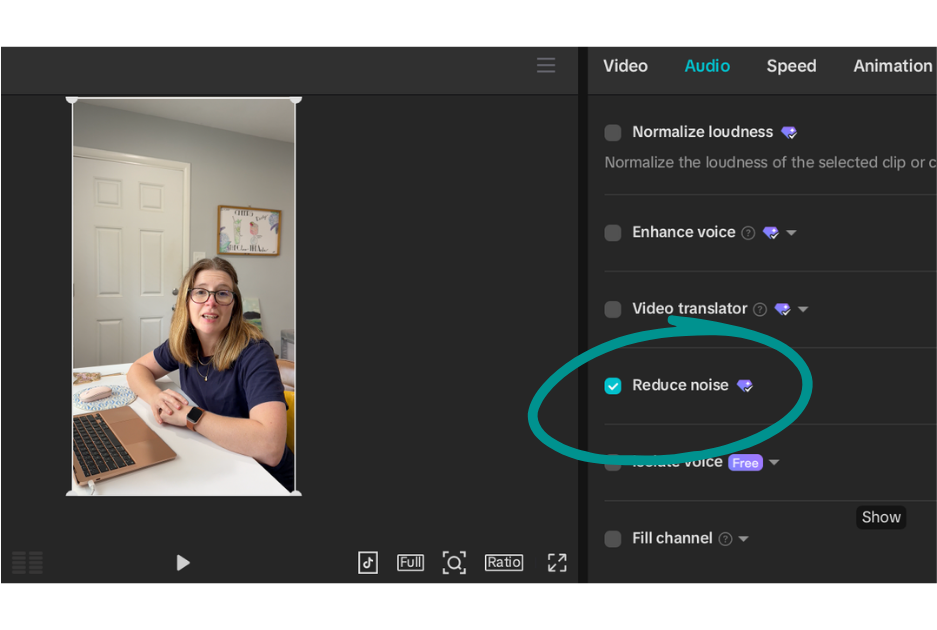
Reduce Noise
Sometimes, even with a microphone, your video may pick up too much background noise. Whether it’s traffic, wind, or a loud public environment, CapCut’s Reduce Noise tool can help clean up sound.
However, sometimes when the background noise is too strong, this tool can make the rest of the audio sound mechanical. When this happens, it’s better not to use the tool and instead refilm the video or, in some cases, isolate the voice.
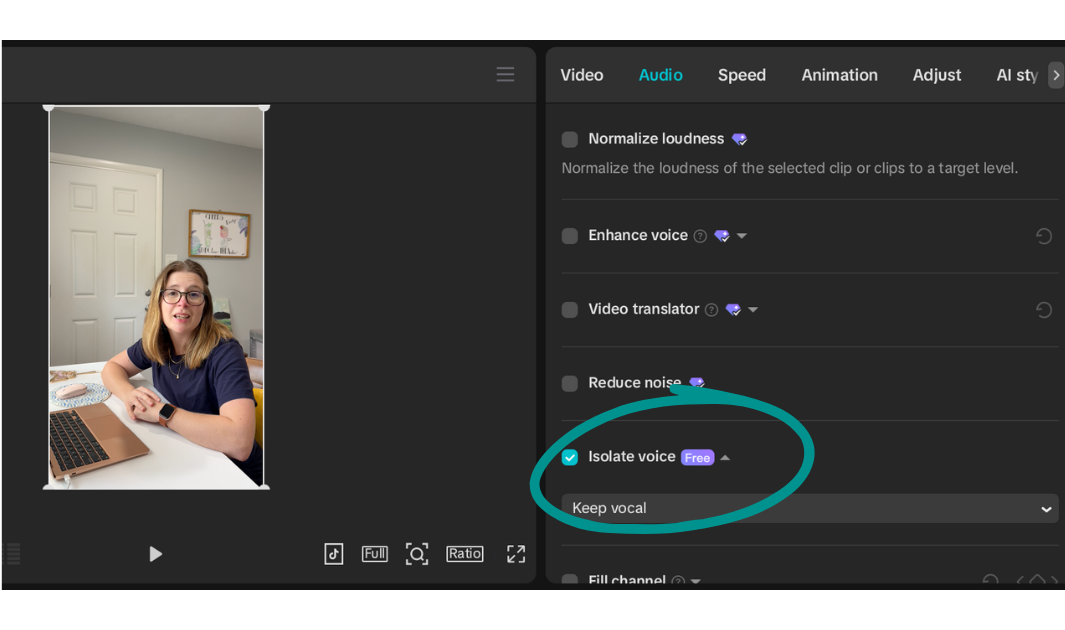
Isolate Voice
Often, when the Reduce Noise tool is ineffective, the Isolate Voice tool can be a helpful alternative. Instead of removing background noise, it focuses on picking up the main speaker’s voice. We often find this tool can produce a cleaner result.
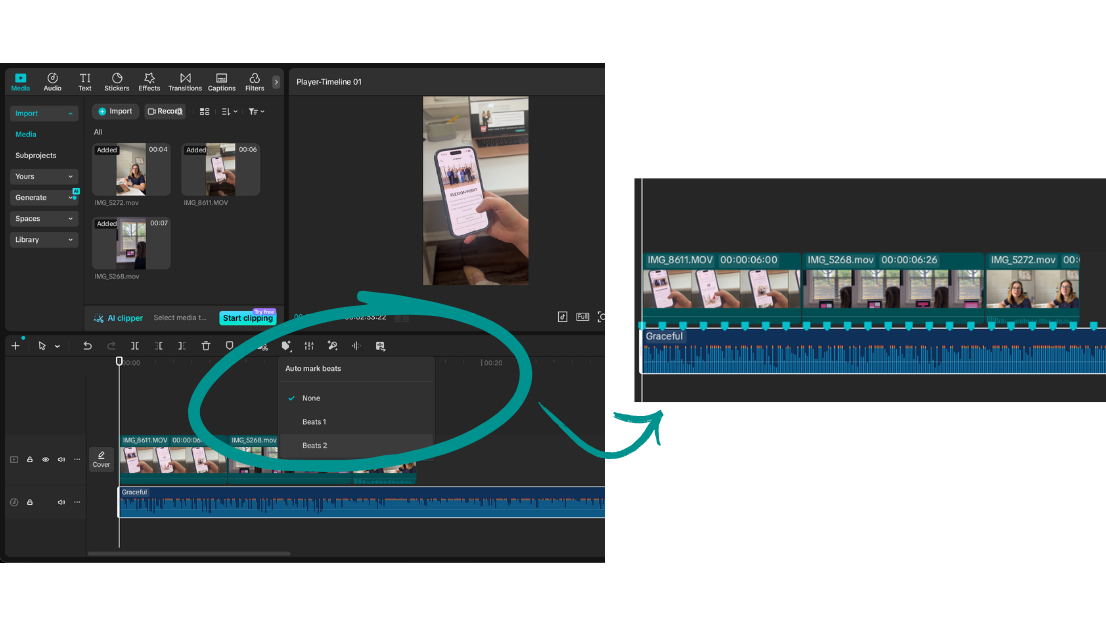
Beat Markers
If you’ve ever tried to align video clips or images to the beat of music manually, you know it can be tedious and time-consuming. CapCut’s beat markers speed up the process while still letting you adjust your clips' timing.
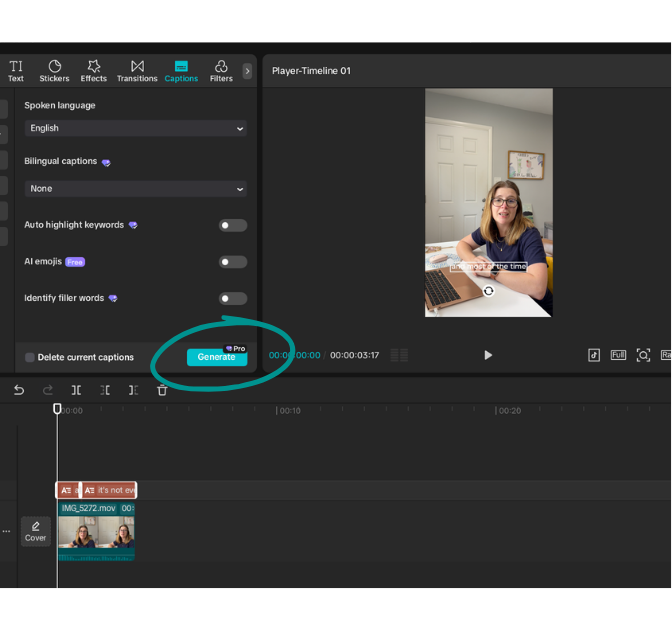
Auto Captions
Saving the best for last, auto captions are one of our most-used AI tools within CapCut. For best results, we recommend making any cuts and edits before generating your captions. While captions are usually accurate, mistakes can happen, especially with brand names or uncommon terms. After they generate, it’s always a good idea to proofread and make the necessary adjustments.
The Goal of Social Media Is to Connect
While you may be tempted to use AI to take over as much of your social media creation as possible, remember what people are looking for when they scroll: connection. Not only will your content resemble several other businesses if you use AI without intention, but your potential customers will have a hard time getting to know you.
People want to do business with people they can trust. The more you show your real team, share authentic moments, and your brand’s personality, the more people will be drawn to your content.

Don’t Have Enough Time to Manage Your Social Media?
Being a business owner is time-consuming. If you have a business in central Arkansas and feel overwhelmed trying to keep up with your social media accounts,
our team at Hummingbird Media can help.
We handle everything: filming, editing, copywriting, posting, Meta ad campaigns, and page management. We take the time to understand your business and its unique brand voice. If you’re ready to take your social media to the next level, we’d love to talk.
Recent Posts